Mixing & Mastering Tip #165 ·
Ableton Multiband Dynamics gets linear phase: why it matters

Ruslan Slatin
Mastering engineer at slatin.pro, Madrid
Ableton is always evolving, and while I’ve moved my main workflow to Reaper, I still keep an eye on Ableton’s updates since I use it for production.
One recent addition in the 12.1.5b4 beta caught my attention: they’ve added a linear phase mode to the native Multiband Dynamics plugin, a feature I’ve dreamed of for years.
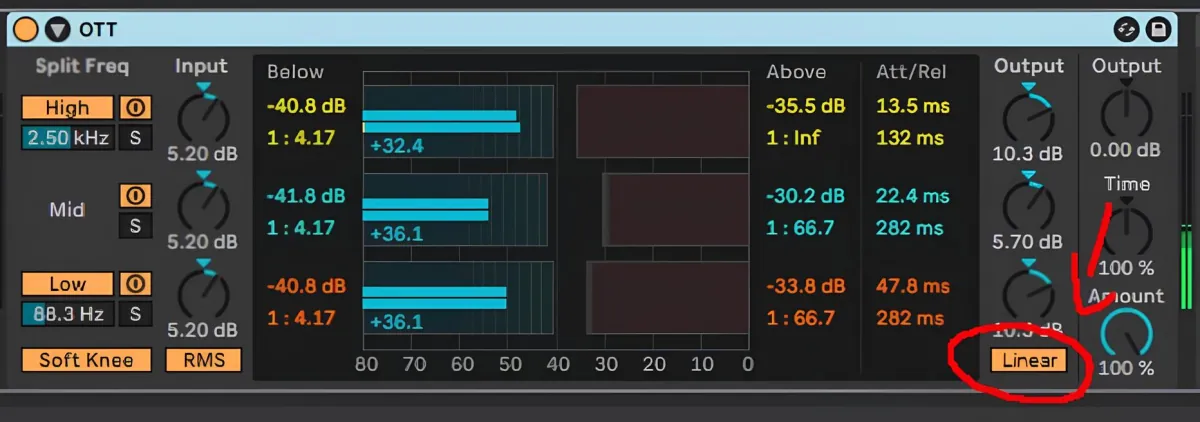
This plugin has always been a favorite of mine for sound design and even mastering. However, its lack of a linear phase mode held me back from using it more often on my masters.
(By the way, I don’t use OTT on the master. I use other configurations.)
Without linear phase, the phase alterations at the crossover points could lead to cancellations and undesirable artifacts. Now, with this update, Ableton users have a versatile tool that can be used even for mastering.
Why linear phase matters in multiband compression
In multiband compression, filters split the frequency spectrum into bands. Without linear phase, these filters introduce phase shifts, causing timing discrepancies between frequencies. This can disrupt the original timing relationships in your mix and smear transients.
By switching to linear phase mode, those shifts are eliminated, preserving the integrity of the audio.
Ableton addressing this limitation is a huge win for precision mixing and mastering workflows. If you’ve been hesitant to use the Multiband Dynamics plugin for these reasons, it’s time to revisit it.
Want this on your own track?
I master more than 1,000 songs a year for artists and labels, from stems or a stereo mix. Send me your track and I'll tell you what it needs.
A new tip like this every week, free: join the newsletter.
Work with me
Whenever you're ready, here's how I can help.
 MentoringMix & Master AcceleratorWeekly video reviews of your tracks, live group calls, and the business side of a studio career.By applicationApply now
  Preset packFUSION150 hand-crafted Valhalla VintageVerb presets. Three clicks to the sound you already hear in your head.20€Get the pack
  CourseAdvanced MicrodynamicsFour hours on the micro-level movement that makes a mix feel alive. Joined by 220+ students.149€See the course
  CourseLow End MasteryKick and bass chemistry, so your low end lands on club rigs and earbuds alike. Joined by 500+ students.159€See the course
  SoftwareStudiOSThe software I run my own studio on: deliveries, client feedback, versions and invoices in one place.14 days freeTry StudiOS