Mixing & Mastering Tip #230 ·
Which Soothe 2 resolution sounds best? Why I use Normal, not Ultra

Ruslan Slatin
Mastering engineer at slatin.pro, Madrid
One small setting people completely overlook in Soothe 2 is the resolution mode. And honestly, it changes the sound A LOT.
Most people immediately think: “Ultra must be the best one.”
But after comparing it on a lot of different material, I kept coming back to the same conclusion: Normal sounds the most natural, at least on Soothe 2.

Better resolution is not better sound
This plugin uses FFT processing, which means it analyzes the signal and detects harmonics across the frequency spectrum. When you increase the resolution, the plugin simply starts detecting more and more tiny harmonics, especially in the high frequencies.
And I mean really tiny ones: super specific little spikes like 5463 Hz, 7321 Hz, you name it.
Technically that sounds impressive, but musically it’s not always a good thing. The plugin starts reacting to every microscopic harmonic in the top end. That makes the processing extremely detailed, but it can also make the result feel sterile.
On top of that, it’s very CPU heavy for something that doesn’t actually help the sound.
My approach
For me, Normal resolution hits the sweet spot. It still detects the important resonances, but it doesn’t chase every tiny harmonic in the signal. The result feels much more musical and natural.
The way I use the plugin matters too. You’ll almost never see me using super sharp bands or hunting ultra-precise frequencies. I treat it more like a multiband compressor, gently controlling harsh areas instead of surgically removing individual frequencies.
When I want to experiment, I always switch the modes in real time while the track is playing.
Watch out
This part is important: don’t change these settings blindly. Actually listen to what they do to the sound.
Sometimes the setting that looks more advanced technically just ends up making the music feel worse.
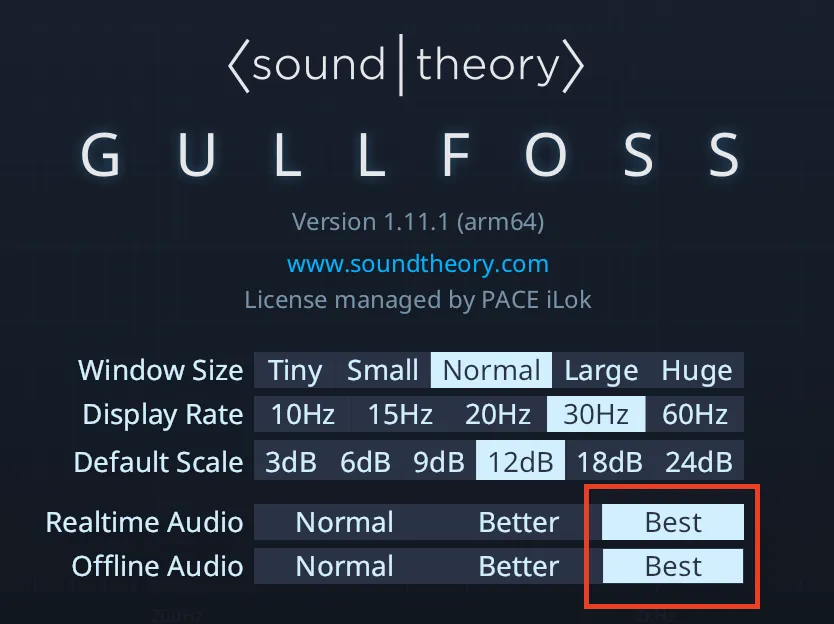
For example, and quite the opposite, Gullfoss sounds best at the higher settings. That was an epiphany for me too, and I highly recommend you check its settings.
Want this on your own track?
I master more than 1,000 songs a year for artists and labels, from stems or a stereo mix. Send me your track and I'll tell you what it needs.
A new tip like this every week, free: join the newsletter.
Work with me
Whenever you're ready, here's how I can help.
 MentoringMix & Master AcceleratorWeekly video reviews of your tracks, live group calls, and the business side of a studio career.By applicationApply now
  Preset packFUSION150 hand-crafted Valhalla VintageVerb presets. Three clicks to the sound you already hear in your head.20€Get the pack
  CourseAdvanced MicrodynamicsFour hours on the micro-level movement that makes a mix feel alive. Joined by 220+ students.149€See the course
  CourseLow End MasteryKick and bass chemistry, so your low end lands on club rigs and earbuds alike. Joined by 500+ students.159€See the course
  SoftwareStudiOSThe software I run my own studio on: deliveries, client feedback, versions and invoices in one place.14 days freeTry StudiOS