Mixing & Mastering Tip #196 ·
Why plugin quality modes and offline oversampling can ruin a master

Ruslan Slatin
Mastering engineer at slatin.pro, Madrid
I still get shocked when I test the different quality modes in plugins.
I get it: each mode has its purpose. Sometimes it’s about CPU, sometimes about workflow. But some of these choices are wild.
Let me give you two examples.
Soothe “Ultra” wrecked my master
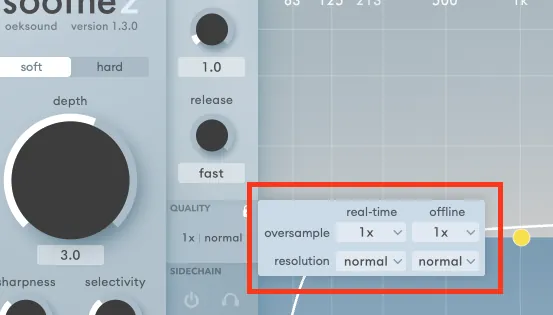
I was using Soothe in “Ultra” resolution with oversampling x4 in offline mode, thinking: “Hey, more detail = better sound, right?”
Nope.
It kept making my mixes too dark. I couldn’t figure it out at first. I just noticed that something felt off in my exported masters. A weird murkiness.
Turns out it was that “Ultra” mode all along. It just sucked on 90% of material.
I’ve stopped using the offline render setting altogether.
If you can’t hear it, why even bother setting it up? If you don’t keep it consistent, how are you even hearing the real result?
If, for some reason (most likely to save CPU), you decide to use oversampling or higher resolution during offline rendering, first make sure you hear it in real time. Then decide what works best for the song.
Oversampling has a sound.
Gullfoss “Best” mode is actually worth it
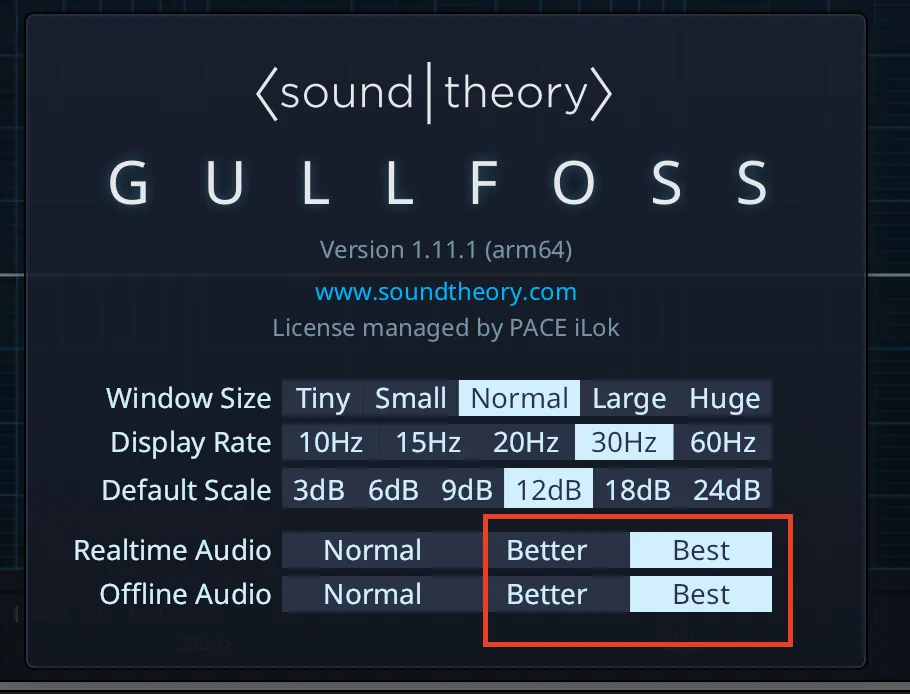
Now flip that. Gullfoss, one of my ride-or-die tools for polishing my vocals and masters, sounds way better in its highest quality mode.
“Best” mode gives this sweet clarity and placement. It just locks things in better.
So yeah, it really depends on the plugin.
Some “high quality” modes are subtle upgrades. Others can mess up your tone if you’re not careful. And some are secret weapons when used right.
Read the manual and investigate the options of every plugin, and keep them consistent between mixing and exporting. That’s the only way to know what’s really happening in your sound.
Want this on your own track?
I master more than 1,000 songs a year for artists and labels, from stems or a stereo mix. Send me your track and I'll tell you what it needs.
A new tip like this every week, free: join the newsletter.
Work with me
Whenever you're ready, here's how I can help.
 MentoringMix & Master AcceleratorWeekly video reviews of your tracks, live group calls, and the business side of a studio career.By applicationApply now
  Preset packFUSION150 hand-crafted Valhalla VintageVerb presets. Three clicks to the sound you already hear in your head.20€Get the pack
  CourseAdvanced MicrodynamicsFour hours on the micro-level movement that makes a mix feel alive. Joined by 220+ students.149€See the course
  CourseLow End MasteryKick and bass chemistry, so your low end lands on club rigs and earbuds alike. Joined by 500+ students.159€See the course
  SoftwareStudiOSThe software I run my own studio on: deliveries, client feedback, versions and invoices in one place.14 days freeTry StudiOS